Registration Log in +44 20 80 89 80 01

Load balancer

Load Balancer intelligently routes traffic across your server cluster to eliminate bottlenecks, maximise resource utilisation, and deliver a flawless user experience even during peak demand.

Powered by VMware NSX Edge

VMware NSX Edge as an all-in-one, software-defined network hub. It's the secure gateway the virtual machines use to access the network, consolidating essential services like firewalling, VPN, dynamic routing, and advanced load balancing into a single, efficient platform.

It seamlessly distributes incoming traffic across multiple virtual servers, even if they're spread across different data centers, for true geographic resilience.

Get Started for Free: Load Balancing on Compact Edge Gateways –
at No Cost


LB


Why You Need a Load Balancer

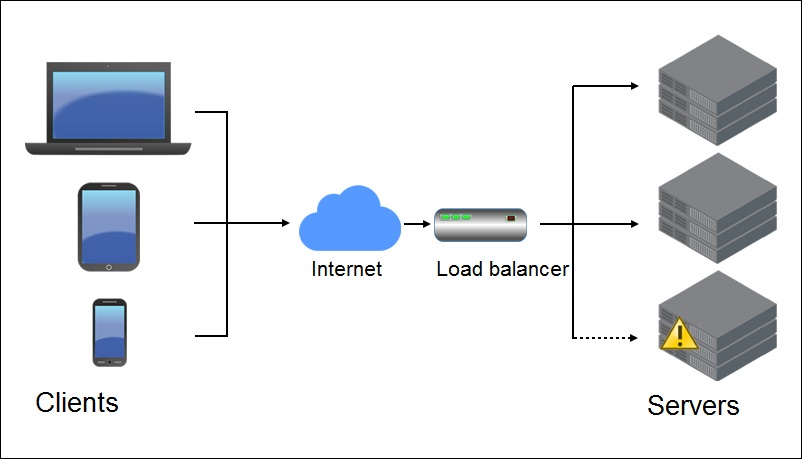
Today's applications are more complex and user expectations are higher than ever. A single point of failure is not an option. A load balancer acts as your strategic traffic controller, sitting between users and your server farm.

It dynamically distributes requests using intelligent methods, preventing any single server from becoming a bottleneck or a critical failure point.
The result? Superior application availability, reduced downtime, and a responsive infrastructure that scales with your business.


Features Designed for Real-World Demands

  • Broad Protocol Support: TCP, UDP, HTTP, HTTPS
  • Intelligent Traffic Distribution: Weighted round robin, IP hash, URI, least connection
  • SSL Certificate Management
  • X-Header Forwarding for client identification
  • L4/L7 Transparent Mode
  • Advanced Health Monitoring
  • Persistence (Sticky Sessions): SourceIP, MSRDP, COOKIE, SSLSESSIONID
  • One-Arm Topology support
  • URL Rewrite & Redirect
  • Application Rules for advanced traffic management
  • IPv6 Support
  • Enhanced CLI for advanced troubleshooting
  • Enable/Disable Individual Pool Members for seamless maintenance
Need Configuration Help? Step-by-step instructions for setting up the Load Balancer in vCloud Director are available in our Knowledge Base.


Service Pricing

Find the perfect fit for your performance and scalability requirements.


Edge (Compact)

Edge (Large)

Edge (Quad-Large)

Edge (X–Large)

vCPU

1

2

4

6

Memory

512 MB 

1 GB 

1 GB 

8 GB 

Disk

512 MB 

512 MB 

512 MB 

4.5 GB 

Price (ex. VAT)
free
$45.00/mo
$90.00/mo
$180.00/mo

Have Questions? We're Here to Help.
Our technical experts are ready to assist you in designing the right solution.
Call us at: +44 20 80 89 80 01 
You can also find other contact methods on our Contact Us page.

FAQ

What is the core purpose of a Load Balancer?
Think of your load balancer as a smart traffic director for your applications. Its primary job is to efficiently distribute incoming user requests across a pool of servers. This ensures no single server becomes overwhelmed, maximizing your application's speed, responsiveness, and overall availability.

What load-balancing methods do you support?

We provide several intelligent algorithms to match your specific application needs:

  • IP Hash: Ensures all requests from a single user (IP address) are sent to the same server, which is great for maintaining user sessions.
  • Round Robin: Distributes requests evenly to each server in sequence—a simple and effective default.
  • URI: Directs all traffic for a specific web address (URL) to a designated server, ideal for caching and HTTP-based applications.
  • Least Connected: The smart choice for dynamic loads; automatically sends new requests to the server with the fewest active connections.

What technology powers your Load Balancer?
Our service is powered by VMware NSX Edge, an enterprise-grade solution that integrates load balancing with a full suite of network services — including Firewall, NAT, VPN, and Dynamic Routing— into a single, powerful virtual appliance.

What are the terms and conditions for using the Load Balancer?

The Load Balancer feature is available for free to all Cloud4U users on the Edge Gateway "Compact" plan. The only prerequisite is that you have at least two virtual machines to distribute traffic between.

Important Performance Note:

VMware recommends using the NSX Edge Gateway 'Large' tier or higher for production environments with significant traffic. The 'Compact' tier has limited RAM, which may be insufficient for storing connection history under heavy load.

You can start with 'Compact' to test and develop. Scaling your Edge Gateway up or down is quick and seamless—taking only 3-5 minutes of downtime with no loss of configuration. You can easily upgrade to 'Large', 'Quad-Large', or 'X-Large' as your needs grow.

→ Compare all the Edge Gateway specifications in our Knowledge Base.


What other tiers do you offer and how do they differ?

We offer four performance tiers to match your workload, from 'Compact' to 'X-Large'. Each tier provides more vCPU, memory, and disk resources to handle greater traffic volumes and connection counts.


How easy is it to configure the Load Balancer?
Incredibly straightforward. A basic setup takes just a few minutes. To help you get started, we provide a detailed, step-by-step configuration guide in our Knowledge Base.

What if I don't have the time or resources to configure it myself?
No problem! Our expert engineers can handle the setup for you. This is a billable professional service. To get started, simply submit a request, and we'll provide a quote based on your specific requirements.


For more information visit knowledgebase, ask online consultant or send an inquiry to our tech support team using ticket system.
Send a request
Let our managers know if you are interested in a solution or a service. They will contacts you within 2 hours.
You also can request a free trial access here
Scroll up!